

TAMI
User Guide


Contents
Product description
TAMI Is an assistive mobility eyewear device designed and engineered to assist people who are blind or visually impaired. It aims to enhance users’ confidence, spatial awareness, and mobility by helping to avoid obstacles above the waist, an area unprotected by the white cane. It alerts the user of obstacles in their path by means of a haptic vibration. TAMI senses the presence of obstacles with 60GHz radar technology. Information is relayed to the user, offering insights into both the location and proximity of potential hazards.
The radar sensors are enclosed in the temples of the eyewear, oriented slightly outward and downward to scan the area ahead. A haptic vibrating motor, positioned at the back of the temple above the ear (temple tip) provides tactile feedback. The radar obstacle detection system offers a full horizontal field of view of approximately 120 degrees and a full vertical field of view of 60 degrees.
Benefits of using TAMI
TAMI is designed to enhance the mobility, spatial awareness, and independence of individuals living with blindness or visual impairments. Users can expect real-time information about the presence, position, and proximity of potential obstacles in their environment while using the device. The benefits of this information include increased confident navigation in both indoor and outdoor settings, reduced risk of collisions, and increased overall safety. Users may benefit from a greater sense of autonomy.
Package contents
-
Y-Charging cable with magnetic connectors
-
Protective eyewear case
-
Microfiber cloth eyewear pouch
-
TAMI device
-
Microfiber eyewear cleaning cloth
-
User guide
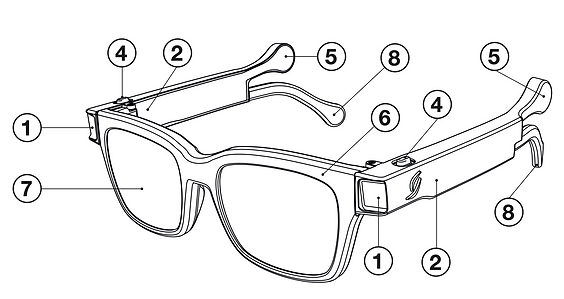
Device overview
-
Radar sensors
-
Speaker
-
Magnetic charging ports
-
Push buttons
-
Vibrating haptic motors
-
Eyewear front
-
Lenses
-
Rubberized temple tips
Main view
Bottom view

Performance characteristics
Parameter | Value range |
|---|---|
Humidity range | 10-80% |
Altitude range | 0 to 2000 meters above sea level |
Atmospheric pressure range | 86 – 106 kPa |
Weight | 60 g |
Plastic cover materials | TR90, rubberized temple tips and push buttons |
Power consumption @3.75V | Idle: 0.375 mW. Ranging without feedback: 112.5 mW. Ranging with feedback: 157.5 mW |
Lenses | CR39 UV400 |
Current @3.75V | Idle: 100µA. Ranging without feedback: 30mA. Ranging with feedback: 42mA |
Temperature range | Storage: -20 / +40 °C. Charging: 0 / +40 °C. Operating: -10 / +40 °C |
Operating voltage range | 3.4V – 4.2V |
Power supply voltage | 5V |
Device storage
TAMI should be stored in a dry environment within the maximum and minimum temperature and humidity limits listed below:
Storage period | Temperature | Relative humidity | Battery percentage |
|---|---|---|---|
Recommended storage | 15°C to 35°C | ≤ 80% RH | 30% – 50% |
Long term (>3 months) | -10°C to +40°C | ≤ 85% RH | 30% – 50% |
Short term (< 1 month) | -20°C to +40°C | ≤ 85% RH | 30% – 50% |
During storage, the battery should be maintained at a state of charge between 30% and 50%. It must not be left fully discharged (0%) or fully charged (100%), as this may damage the battery and reduce its lifespan. If stored for extended periods, it is recommended to recharge the battery every six months.
Device operation
TAMI is equipped with two push buttons; each located on the top, front-end of each temple. Buttons can be used interchangeably to turn the device on and off, to change feedback modes, and to check the device’s battery level.
Turning the device ON and OFF
To turn the device on and off, long press the button on either temple for one second. A chime sound from both temples confirms that the glasses are ON or OFF. Release the button. If ON, the eyewear temples will immediately start to vibrate if you are near an obstacle.
Checking the battery level during use
Battery level may be checked while in use with a double button press. One chime indicates battery level below one-thirds, two chimes indicate battery level between one-third and two-thirds, three chimes indicate battery level between two-thirds and 100% charged.
Charging the device
Full charging takes approximately 4 hours. On the underside of each temple, you will find a magnetic charging port (device overview, component 3).
-
Plug the supplied Y-cable into a USB Type A wall adaptor or an accessory such as a laptop or power bank for charging.
-
Connect the supplied Y-cable to both charging ports on the bottom of each eyewear arm.
-
A chime sound from both sides indicates when the glasses have been properly plugged in.
Note: The device cannot be turned on or off while plugged in and charging.
Note: Use only a standard 5V DC USB charging adapter with a current output of 500mA to 1A (recommended). Using adapters with incorrect voltage may damage the battery. Check compliance of the adapter with IEC/UL 60950-1.
Obstacle detection with TAMI
Vibration feedback is directional:
-
When an obstacle is on the left, only the left temple vibrates; for obstacles on the right, only the right temple vibrates.
-
For obstacles directly ahead, both temples vibrate simultaneously.
Vibration frequency indicates obstacle proximity:
-
High-frequency pulses signal nearby obstacles within the danger zone, where immediate action may be required to avoid collision.
-
Low-frequency pulses signal more distant obstacles within the awareness zone, requiring situational attention but not urgent action for obstacle avoidance.
Long range / Short range mode of the device
The device may be set to two different modes using the push button on either side. These are long range mode and short-range mode.
Long range mode has longer sensor ranging thresholds to compensate for faster walking speeds not exceeding 4 km/h and spaces that are more open.
Short range mode has shorter ranging thresholds to more precisely feel the distance to obstacles in the user’s immediate space. The short range mode can be used for smaller operating spaces and slower walking speeds to minimize distracting vibration during use.
When turned on, a short button press changes the glasses settings between Long and Short range modes:
In long range mode the default awareness zone threshold is 1.7 m and the danger threshold is 1 m.
In short range mode the default awareness zone threshold is 1.2 m and the danger threshold is 0.6 m.
Press the button to cycle between operating modes. An audio chime confirms the selected mode: two short chimes indicate short-range mode (reduced detection distance), while two long chimes indicate long-range mode (extended detection distance). TAMI® defaults to the last active mode when turned on. A corresponding vibration pattern will confirm the current mode.
Note: The radar sensors do not detect objects within approximately 25 cm of the device, regardless of whether short-range or long-range mode is selected. This undetected zone may be advantageous during use, as items such as hats, hoods, umbrellas, or handheld devices positioned within this range will not trigger haptic feedback.
Device sounds during operation
TAMI has a small speaker on each arm. Sound recordings and their significance can be found below:
Ranging on
Ranging off
Charging
Charging complete
Long range mode
Short range mode
Battery low
Error
Intended purpose and conditions for use
TAMI is an electronic mobility aid intended for detection of obstacles located in the upper-body zone. It is intended for individuals with total or partial blindness or conditions that severely impact visual perception, including degenerative eye diseases and other visual impairments. Diseased such as, but not limited to macular
degeneration, glaucoma, retinitis pigmentosa, cataracts, diabetic retinopathy, total blindness, partial blindness, legal blindness etc.
Using TAMI does not require advanced skills, making it accessible to a wide range of users. After purchase, you are strongly recommended to consult the full instructions for use, online guides, and consult an orientation and mobility specialist to ensure full understanding of operation of the device and to make the most of its features.
Characterization of the use environment
TAMI is designed for everyday use, both indoors and outdoors, to assist users in detecting and avoiding obstacles that may be difficult to perceive with conventional tools or methods. TAMI is not intended to replace the white cane. It cannot detect drop-offs at ground level, such as stairs or holes. In conjunction to the white cane, it provides added protection from obstacles in the upper body. Please ensure you have received proper orientation and mobility training and that you are using a white cane of appropriate length for you.
The device will continue to function normally in light rain but is not suitable for use in extreme conditions and should be protected from severe weather. The sensors are calibrated for detection of most types of dangerous obstacles, such as protruding tree branches, metallic objects, and poles. The sensors operate by receiving reflections from objects. At full range (1.7 m), the sensors may not detect soft fabrics, highly angled surfaces, or small objects, for instance branches with a cross-section of 5 centimeters or less.
Safety information
-
Do not charge the device if it shows signs of damage or abnormal behavior.
-
Do not use in extreme weather conditions, in excessive heat or cold, or expose to direct heat.
-
Do not use as a substitute for usual mobility equipment including the white cane or guide dog. Users should consider using TAMI® alongside traditional aids for optimal safety and navigation.
-
Proper training is necessary for safe mobility. Obtain proper training before using TAMI®. Consult the instructions for use and an orientation and mobility specialist.
-
Not for children under the age of 14 years old.
-
Do not use while operating vehicles or machinery.
-
Not for use during high-speed movement, including running, cycling, or sports.
-
Do not use near strong electromagnetic interference such as MRI machines or powerful radio equipment.
-
Discontinue use immediately if the device appears to be damaged, malfunctioning, or compromised in any way.
-
Regularly inspect the device for damage. Stop using immediately if eyewear arms show any signs of swelling, overheating, or leakage.
-
TAMI is appropriate for use under rain, but should not be submerged in water nor used under heavy rainfall or high humidity.
-
TAMI may have difficulty detecting highly angled surfaces that are very smooth, potentially leading to delayed or missed obstacle alerts.
-
Walking at a fast pace (over 4 km/h) may reduce the time available for users to receive and process tactile feedback from TAMI. In such cases, the system may be unable to alert the user in time to avoid obstacles.
-
TAMI must be used exclusively with manufacturer-approved accessories, such as the custom charging cable, to ensure proper functioning.
-
To avoid the risk of overheating, fire, or device malfunction, charge TAMI only with the provided charging cable.
-
Using unapproved cables or adapters may damage the device.
-
The device is incompatible with all unauthorized software or modifications. Any attempt to modify the software or add third-party components to the device may impair correct functionality and void the warranty.
-
Do not use during rest or sleep.
-
Although the vibration feedback generated by the device is designed to be gentle, users should take breaks if they experience discomfort from extended use.
-
TAMI should be stored in its protective case when not in use and handled carefully to avoid damage to electronic components, frame, and lenses. Dropping the device, bending or applying excessive force to it may compromise its functionality.
-
Lighthouse Tech recommends that TAMI is stored in its protective case when not in use to avoid any damage from external sources.
-
TAMI contains a rechargeable lithium-ion battery. Do not attempt to open the casing or replace the battery.
-
When the device reaches the end of its life, dispose of it in accordance with local regulations for electronic devices and batteries.
-
Recharge the device in a dry environment away from excessive moisture, wet surfaces and sources of water to avoid electric shock or damage to the device.
-
To avoid damage to the battery, avoid leaving the device in excessively hot or cold environments for prolonged periods.
-
TAMI uses low-power Bluetooth® technology for connectivity. Although the device operates within international safety standards and emits minimal electromagnetic energy, individuals with implanted medical devices such as pacemakers or defibrillators are advised to maintain a minimum distance of
15 cm (6 inches) between TAMI and the implant. Before using TAMI, consult your physician to ensure safe use. Discontinue use immediately if you experience any interference or unusual symptoms. -
It is recommended to regularly check proper radar functioning on both sides. Check that the sensors are detecting objects on both sides and that they are not obstructed or otherwise not functioning. Point TAMI toward a large surface like a wall and feel for vibration feedback on both sides.
Residual risks
Users may be tempted to rely solely on TAMI, potentially reducing situational awareness, discontinuing use of traditional mobility aids, or overconfidence with the capabilities of the device. TAMI is intended to complement and not to replace techniques you acquired during your orientation and mobility training, your senses, and your primary orientation tools. To reduce residual risk from misuse, acquire proper training for use of TAMI® and read the instructions for use.
Foreseeable misuse
-
Do not attempt to use TAMI if untrained.
-
Do not use without a primary mobility aid, such as a white cane or guide dog.
-
Do not use under heavy rain.
-
Do not use while running or walking at speeds over 4 km/h.
-
Do not attempt to use TAMI® to detect low or ground-level obstacles or drop-offs.
-
Do not charge with an adaptor of output greater than 5V, 1A and/or no IEC/EN 60950-1 approval.
Warranty
The warranty period for TAMI begins on the date of the invoice and remains valid for a period of 2 years within the European Union (EU) and European Economic Area (EEA), unless otherwise specified in a written agreement. The warranty applies only to the original purchaser and covers defects in materials and workmanship under normal use conditions (see Safety information section for disclaimers), in accordance with the instructions provided in this manual. This warranty applies to the complete product, including internal components and accessories provided in the original packaging. Damage resulting from misuse, neglect, improper maintenance,
exposure to liquids, impact, unauthorized modifications, or service by third parties not authorized by Lighthouse Tech SA is not covered under this warranty. Use of the device outside the conditions listed in the Safety information section of this manual may void the warranty. If a defect covered by this warranty occurs, the product will be repaired or replaced with a unit of equal value and function at the discretion of Lighthouse Tech. Refunds are not provided under this warranty.
Lighthouse Tech will provide a replacement device of comparable
specifications if:
-
The product experiences more than one confirmed defect within the warranty period.
-
The repair takes longer than 20 business days from the date the device is received by the service provider.
-
The product is determined by the manufacturer or authorized partner to be non-repairable.
CE declaration of conformity

FCC statement

This equipment has been tested and found to comply with the limits for a Class B digital
device, pursuant to part 15 of the FCC Rules. These limits are designed to provide
reasonable protection against harmful interference in a residential installation.
This equipment generates, uses and can radiate radio frequency energy and, if not installed and used in accordance with the instructions, may cause harmful interference to radio communications.
However, there is no guarantee that interference will not occur in a particular installation.
If this equipment does cause harmful interference to radio or television reception, which can be determined by turning the equipment off and on, the user is encouraged to try to correct the interference by one or
more of the following measures:
-
Reorient or relocate the receiving antenna.
-
Increase the separation between the equipment and receiver.
-
Connect the equipment into an outlet on a circuit different from that to which the receiver is connected.
-
Consult the dealer or an experienced radio/TV technician for help.
Caution: Any changes or modifications to this device not explicitly approved by manufacturer could void your authority to operate this equipment.
This device complies with part 15 of the FCC Rules. Operation is subject to the following two conditions: (1) This device may not cause harmful interference, and (2) this device must accept any interference received, including interference that may cause undesired operation.
RF exposure information
The device has been evaluated to meet general RF exposure requirement. The device can be used in portable exposure condition without restriction.