
Product manual
TAMI® User Guide
This is the official, up-to-date version of the user manual. We will provide a printed version of the manual on request.
| Model | Version | Published |
|---|---|---|
| TAMI 01 — XXXX-FRM1-XXX | 1.3 | September 28, 2026 |
Product description
TAMI® Is an assistive mobility eyewear device designed and engineered to assist people who are blind or visually impaired. It aims to enhance users’ confidence, spatial awareness, and mobility by helping to avoid obstacles above the waist, an area unprotected by the white cane. TAMI® senses the presence of obstacles with 60GHz radar technology. Information is relayed to the user with vibrotactile feedback in the form of gentle vibration pulses to indicate both the location and proximity of potential hazards.
The radar sensors are enclosed in each of the temples of the eyewear frame, oriented slightly outward and downward to scan the area ahead. A haptic motor, positioned at the back of the temple above the ear (temple tip) provides vibrotactile feedback. The radar obstacle detection system offers a full horizontal field of view of approximately 120 degrees and a full vertical field of view of 60 degrees.
The lenses provided with TAMI® are interchangeable.
TAMI® is a standalone obstacle detection device that does not require an internet connection or smartphone to use. An optional accessory app, TAMI Guide, is available for Android or iOS. The app is not necessary for normal use, but it is recommended to update firmware and to customise settings.
Benefits of using TAMI®
TAMI® is designed to enhance the mobility, spatial awareness, and independence of individuals living with blindness or visual impairments. Users can expect real-time information about the presence, position, and proximity of potential obstacles in their environment while using the device. The benefits of this information include increased confidence while navigating in both outdoor and indoor settings, reduced risk of collisions, and increased overall safety. Users may benefit from a greater sense of autonomy.
Intended purpose and conditions for use
TAMI® is an electronic mobility aid intended for detection of obstacles located in the upper-body zone. It is intended for individuals with total or partial blindness or conditions that severely impact visual perception, including degenerative eye diseases and other visual impairments. Diseased such as, but not limited to macular degeneration, glaucoma, retinitis pigmentosa, cataracts, diabetic retinopathy, total blindness, partial blindness, legal blindness etc.
TAMI® is designed for the final user as the intended operator. This means that the user is the person responsible for using the device for its purpose, as defined in IEC 60601-1. TAMI® was designed and tested for safe and effective operation by the user without requiring the supervision of a healthcare professional.
Using TAMI® does not require advanced skills, making it accessible to a wide range of users. The user is responsible for reading and understanding the instructions for use, including safety information, routine maintenance and checks, and troubleshooting. It is strongly recommended to consult and orientation and mobility specialist to ensure full understanding of device operation and to make the most of its features.
Characterization of the use environment
TAMI® is designed for everyday use, both indoors and outdoors, to assist users in detecting and avoiding obstacles that may be difficult to perceive with conventional tools or methods. TAMI® is not intended to replace the white cane. It cannot detect drop-offs at ground level, such as stairs or holes. In conjunction to the white cane, it provides added protection from overhead obstacles. Please ensure you have received orientation and mobility training and that you are using a white cane that is appropriate for you.
The device will continue to function normally in wet weather but is not suitable for use in extreme conditions and should be protected from severe weather. The sensors are calibrated for detection of most types of dangerous obstacles, such as protruding tree branches, metallic objects, and poles. The sensors operate by receiving reflections from objects. At full range (2.5 m / 8.2'), the sensors may not detect soft fabrics, highly angled surfaces, or small objects, for instance branches with a cross-section of 5 cm (2") or less.
Package contents
- Y-Charging cable with magnetic connectors
- Protective eyewear case
- Microfiber cloth eyewear pouch
- TAMI® device
- Microfiber eyewear cleaning cloth
- Instructions for use
Device storage
TAMI® should be stored in a dry environment within the maximum and minimum temperature and humidity limits listed in the table below. During storage, batteries should be maintained at a state of charge between 30% and 50%. They must not be stored fully discharged (0%) or fully charged (100%), as this may result in damage and reduce battery lifespan. If stored for extended periods, it is recommended to recharge the device every six months.
| Storage period | Temperature | Relative humidity | Battery percentage |
|---|---|---|---|
| Short term (< 1 month) | -20 / 40 °C | ≤ 85% RH | 30% – 50% |
| Long term (> 3 months) | -10 / 40 °C | ≤ 85% RH | 30% – 50% |
| Recommended storage | 15 / 35 °C | ≤ 80% RH | 30% – 50% |
Performance characteristics
| Parameter | Value range |
|---|---|
| Power supply voltage and current | 5 V DC under 1 A, USB Type A |
| Operating voltage range | 3.4 V – 4.2 V on battery |
| Temperature range | Charging: 0 / +40 °C (32 / 104 °F). Operating: -10 / +40 °C (14 / 104 °F) |
| Current @3.75 V | Idle: 100 µA. Obstacle detection without feedback: 30 mA. Obstacle detection with feedback: 42 mA |
| Power consumption @3.75 V | Idle: 0.375 mW. Obstacle detection without feedback: 112.5 mW. Obstacle detection with feedback: 157.5 mW |
| Lenses (standard) | CR39 UV400 |
| Plastic cover materials | TR90, rubberized temple tips and push buttons |
| Weight | 58 g (2 oz) |
| Atmospheric pressure range | 86 – 106 kPa |
| Altitude range | 0 to 2000 m (0 - 6500') above sea level |
| Humidity range | 10-80% |
Device overview
- Radar sensors
- Speaker
- Magnetic charging ports
- Push buttons
- Vibrating haptic motors
- Eyewear front
- Lenses
- Rubberized temple tips

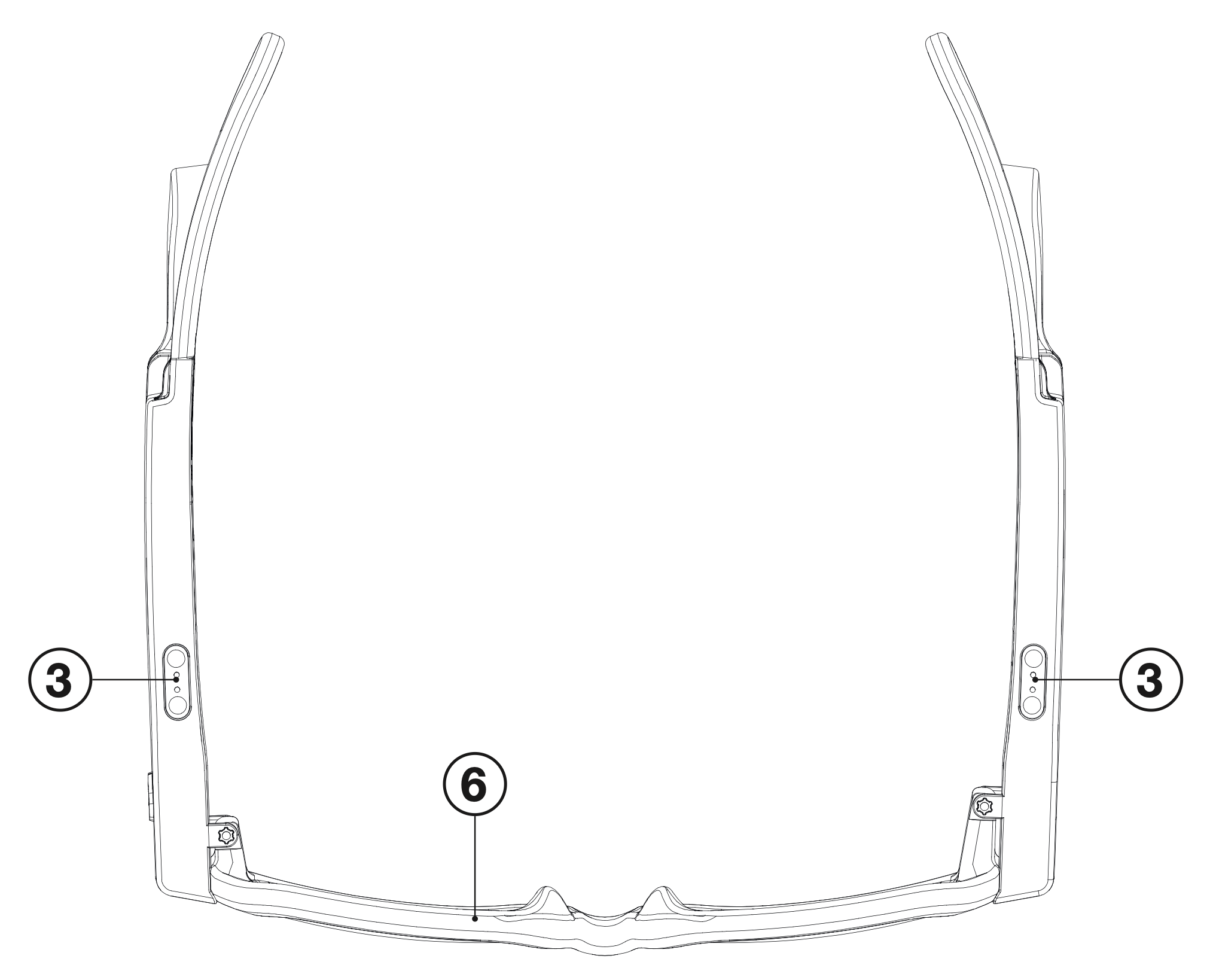
Device operation
TAMI® is designed to be worn for prolonged periods as an obstacle detector. The duration on battery power is 4-5 hours per charge depending on use. TAMI® is equipped with two push buttons; each located on the top, front-end of each temple. Buttons can be used interchangeably to turn the device on and off, to change feedback modes, and to check the device’s battery level. You may also interact with the device by double-tapping on either of the arms.
Turning the device ON and OFF
To turn the device on and off, long press the button on either temple for one second. A chime sound from both temples confirms that the glasses are ON or OFF. Release the button. If ON, the eyewear temples will immediately start to vibrate if you are near an obstacle.
Checking the battery level during use
Battery levels may be checked while in use or while off with a double button press on each arm. One chime indicates battery level below one-third, two chimes indicate a level between one-third and two-thirds, three chimes indicate a level between two-thirds and 100%.
Note: The battery level may be checked in the optional TAMI Guide app when connected to the device.
Charging the device
Full charging takes approximately 4 hours. On the underside of each temple, you will find a magnetic charging port (see device overview, component 3).
- Plug the supplied Y-cable into a USB Type A wall adaptor or an accessory such as a laptop or power bank for charging.
- Connect the supplied Y-cable to both charging ports on the bottom of each eyewear arm.
- A chime sound from both sides indicates when the glasses have been properly plugged in.
Note: The device cannot be turned on or off while plugged in and charging.
Note: Use only a standard 5 V DC USB Type A charging adapter with a current output of 500 mA to 1 A (recommended). Using adapters with incorrect voltage may damage the battery. Check compliance of the adapter with IEC/UL 60950-1.
Obstacle detection with TAMI®
Two kinds of vibrotactile feedback are described throughout this manual — the terms below are used consistently to avoid confusion:
- Obstacle alert: Vibrotactile feedback indicating the detection of an obstacle.
- Device feedback: Feedback indicating a device status or user interaction.
Note: The default behaviour for device feedback is combined audio and vibrotactile. It is possible to select between audio, vibrotactile, and combined feedback for alerts.
Vibrotactile feedback is directional:
- When an obstacle is on the left, only the left temple vibrates; for obstacles on the right, only the right temple vibrates.
- For obstacles directly ahead, both temples vibrate simultaneously.
Vibration frequency indicates obstacle proximity:
- High-frequency pulses signal nearby obstacles within the danger zone, where immediate action may be required to avoid collision.
- Low-frequency pulses signal more distant obstacles within the awareness zone, requiring situational attention but not urgent action for obstacle avoidance.
Long range / Short range operation modes
The device may be set to two different modes using the push button on either side. These are long range mode and short-range mode.
Long range mode has longer sensor ranging thresholds required for walking outdoors or in spaces that are more open. This mode is recommended during normal use.
Short range mode has shorter ranging thresholds to more precisely feel the distance to obstacles in the user’s immediate space. The short range mode can be used for smaller operating spaces and slow walking speeds and is not recommended for normal use while walking outdoors because it does not give appropriate warning time for obstacles.
- In long range mode the default awareness zone threshold is 2.5 m (8.2') and the danger threshold is 1.2 m (4').
- In short range mode the default awareness zone threshold is 1.2 m (4') and the danger threshold is 0.6 m (2').
Press the button to cycle between operating modes. An audio chime confirms the selected mode: two short chimes indicate short-range mode (reduced detection distance), while two long chimes indicate long-range mode (extended detection distance). TAMI® will preserve the last active mode when turned on. A corresponding chime will confirm the current mode when the device is turned on.
Note: The radar sensors do not detect objects within approximately 25 cm (10") of the device, regardless of whether short-range or long-range mode is selected. This undetected zone may be advantageous during use, as items such as hats, hoods, umbrellas, or handheld devices positioned within this range will not trigger vibrotactile feedback.
Device sounds during operation
TAMI® has a small speaker on each arm. Sound recordings and their significance can be found below:
Safety information
- Do not use as a substitute for usual mobility equipment including the white cane or guide dog. Users should consider using TAMI® alongside traditional aids for optimal safety and navigation.
- Proper training is necessary for safe mobility. Obtain proper training before using TAMI®. Consult the instructions for use and an orientation and mobility specialist.
- Not for use by children due to TAMI’s sizing availability. Please ensure good fit before use. The device should stay firmly in place. Ensure you comfortably feel vibrotactile feedback.
- Do not use while operating vehicles or machinery.
- Not for use during high-speed movement, including running, cycling, or sports.
- Walking at a fast pace reduces time available for users to receive and process vibrotactile feedback from TAMI®. In such cases, the system may be unable to alert the user in time to avoid obstacles.
- Do not use near strong electromagnetic interference such as MRI machines or powerful radio equipment.
- Regularly inspect the device for damage. Stop using immediately if eyewear arms show any signs of swelling, overheating, or leakage.
- Do not charge the device if it shows signs of damage or abnormal behavior.
- TAMI® must be used exclusively with manufacturer-approved accessories, such as the included charging cable, to ensure proper functioning and avoid the risk of overheating, fire, or device malfunction.
- TAMI® is appropriate for use in wet weather, but should not be submerged in water nor used under heavy rainfall.
- Do not use in excessive heat or cold, or expose to direct heat.
- The obstacle sensors may have difficulty detecting highly angled surfaces that are very smooth, potentially leading to delayed or missed obstacle alerts.
- The device is incompatible with all unauthorized software or modifications. Any attempt to modify the software or add third-party components to the device may impair correct functioning and void the warranty.
- Do not service or maintain the device if it is in use.
- Do not use during rest or sleep.
- Although the vibrotactile feedback generated by the device is designed to be gentle, users should take breaks if they experience discomfort from extended use.
- TAMI® should be stored in its protective case when not in use and handled carefully to avoid damage to electronic components, frame, and lenses. Dropping the device, bending or applying excessive force to it may compromise its functioning.
- TAMI® contains a rechargeable lithium-ion battery. Do not attempt to open the casing or replace the battery.
- Recharge the device in a dry environment away from excessive moisture, wet surfaces and sources of water to avoid electric shock or damage to the device.
- To avoid damage to the battery, do not leave the device in excessively hot or cold environments for prolonged periods.
- TAMI® uses low-power Bluetooth® technology for connectivity. Although the device operates within international safety standards and emits minimal electromagnetic energy, individuals with implanted medical devices such as pacemakers or defibrillators are advised to maintain a minimum distance of 15 cm (6") between TAMI® and the implant. Before using TAMI®, consult your physician to ensure safe use. Discontinue use immediately if you experience any interference or unusual symptoms.
- Regularly check proper radar functioning on both sides by checking that the sensors are detecting objects on both sides and that they are not obstructed or otherwise not functioning. Point TAMI® toward a large surface like a wall and feel for vibrotactile feedback on both sides.
Residual risks
Users may be tempted to rely solely on TAMI®, potentially reducing situational awareness, discontinuing use of traditional mobility aids, or overconfidence with the capabilities of the device. TAMI® is intended to complement and not to replace techniques acquired during your orientation and mobility training, your senses, and your primary orientation tools. To reduce residual risk from misuse, acquire proper training for use of TAMI® and thoroughly consult the instructions for use.
Foreseeable misuse
- Do not attempt to use TAMI® if untrained.
- Do not use without a primary mobility aid, such as a white cane or guide dog.
- Do not use under heavy rain.
- Do not use while running or walking quickly.
- Do not attempt to use TAMI® to detect low or ground-level obstacles or dropoffs.
- Do not charge with an adaptor of output greater than 5 V 1 A and/or no IEC/EN 60950-1 approval.
Troubleshooting
If you receive an error sound from the device when you attempt to turn it on, try resetting the device as described below before contacting a service center.
Hold the device with both hands and firmly depress each button sequentially for seven seconds. Keep the button pressed for a full seven seconds even if you hear an error chime. After seven seconds, you should hear a confirmation chime meaning the device has been correctly reset. Wait up to twenty seconds before using your device again. If this procedure does not work, contact a service center for assistance.
Warranty
The warranty period for TAMI® begins on the date of the invoice and remains valid for a period of 2 years within the European Union (EU) and European Economic Area (EEA), unless otherwise specified in a written agreement. The warranty applies only to the original purchaser and covers defects in materials and workmanship under normal use conditions (see Safety information section for disclaimers), in accordance with the instructions provided in this manual.
This warranty applies to the complete product, including internal components and accessories provided in the original packaging. Damage resulting from misuse, neglect, improper maintenance, exposure to liquids, impact, unauthorized modifications, or service by third parties not authorized by Lighthouse Tech SA is not covered under this warranty. Use of the device outside the conditions listed in the Safety information section of this manual may void the warranty. If a defect covered by this warranty occurs, the product will be repaired or replaced with a unit of equal value and function at the discretion of Lighthouse Tech. Refunds are not provided under this warranty.
Lighthouse Tech will provide a replacement device of comparable specifications if:
- The product experiences more than one confirmed defect within the warranty period.
- The repair takes longer than 20 business days from the date the device is received by the service provider.
- The product is determined by the manufacturer or authorized partner to be non-repairable.
CE declaration of conformity

FCC statement

This equipment has been tested and found to comply with the limits for a Class B digital device, pursuant to part 15 of the FCC Rules. These limits are designed to provide reasonable protection against harmful interference in a residential installation.
This equipment generates, uses and can radiate radio frequency energy and, if not installed and used in accordance with the instructions, may cause harmful interference to radio communications. However, there is no guarantee that interference will not occur in a particular installation.
If this equipment does cause harmful interference to radio or television reception, which can be determined by turning the equipment off and on, the user is encouraged to try to correct the interference by one or more of the following measures:
- Reorient or relocate the receiving antenna.
- Increase the separation between the equipment and receiver.
- Connect the equipment into an outlet on a circuit different from that to which the receiver is connected.
- Consult the dealer or an experienced radio/TV technician for help.
Caution: Any changes or modifications to this device not explicitly approved by manufacturer could void your authority to operate this equipment.
This device complies with part 15 of the FCC Rules. Operation is subject to the following two conditions: (1) This device may not cause harmful interference, and (2) this device must accept any interference received, including interference that may cause undesired operation.
RF Exposure Information
The device has been evaluated to meet general RF exposure requirement. The device can be used in portable exposure condition without restriction.
Radio Compliance — Japan
This equipment contains specified radio equipment that has been certified under the Technical Regulation Conformity Certification pursuant to the Radio Law.
| Module | Function | Applicable Regulation | Certification Number | Certification Date |
|---|---|---|---|---|
| Acconeer A121 | Low-power motion sensor, 57–64 GHz | Certification Ordinance, Article 2-1-8 | 005-103273 | 2024/6/20 |
| Insight SiP ISP1807 | 2.4 GHz wideband low-power data | Radio Law, Article 2, Paragraph 1, Item 19 | 020-240153 | 2024/5/2 |
Notes: The radio modules listed above must not be modified, altered, or have their RF circuitry changed. Doing so voids the certification.
Disposal of batteries

This device contains electronic components and a rechargeable battery and must not be disposed of together with household waste. For countries with a dedicated waste collection system, the symbol of the crossed-out wheeled bin on the product (reported here), its packaging, or accompanying documentation indicates that the device and its battery should be taken to an authorized collection point for proper recycling and disposal. Proper disposal helps prevent negative consequences for the environment and human health. Users should contact local authorities or their distributor for information on the correct disposal procedure. TAMI® and its components must not be mixed with general commercial waste. If the battery includes substances such as mercury (Hg), cadmium (Cd), or lead (Pb) above threshold levels, these will be marked accordingly, in compliance with Directive 2006/66/EC.
Manufacturer details and symbols

Lighthouse Tech SA
- Via Maestri Comacini 10C
- 6834 Morbio Inferiore
- Switzerland
Contact: info@lighthousetech.ch
Seller: Refer to customer invoice for contact information.
Symbols used on the label and packaging
| Symbol | Meaning |
|---|---|
 | Serial number (SN): The serial number is 8 digits and is located on the inside of the right temple. Example 06250001. |
 | Temperature limitation: This symbol indicates temperature limitations on the packaging label. |
 | BF type applied part: The product is a BF type application part. This symbol on the label indicates Body Floating Applied Parts, meaning parts that touch the body are isolated from the earth ("floating"), can be conductive, or have medium to long-term contact. |
 | Consult instructions for use: This icon on the label serves as a directive to consult the user manual for detailed guidance on operation, maintenance, and troubleshooting. Proper reference to the manual ensures that the product operates reliably and safely within its design parameters. |
 | IP55: The IP55 marking specifies the product’s protection level against the ingress of solid objects and liquids, as defined by the IEC 60529 standard. The first digit (5 – dust and contact protection) stands for protection against limited dust ingress. While not completely dust-tight, dust can enter in small quantities but will not interfere with the device’s normal operation. It also provides protection against accidental contact with live parts. The second digit (5 – water jet protection) means it can withstand rain, splashes, or spray, but not immersion in water. |
Get TAMI® and experience a whole new way to navigate obstacles
Worldwide shipping.