
Training manual
Learn to use TAMI®
This training manual is meant to familiarize you with TAMI® and help you take your first steps with the device. Be sure to read the full user manual before use, to make sure you have understood the safety instructions.
| Company | Version | Published |
|---|---|---|
| Lighthouse Tech SA | 1.3 | September 2026 |
This is the official, up-to-date version of the training manual. We will provide a printed version of the manual on request.
Learning to navigate with TAMI®
TAMI® sensors
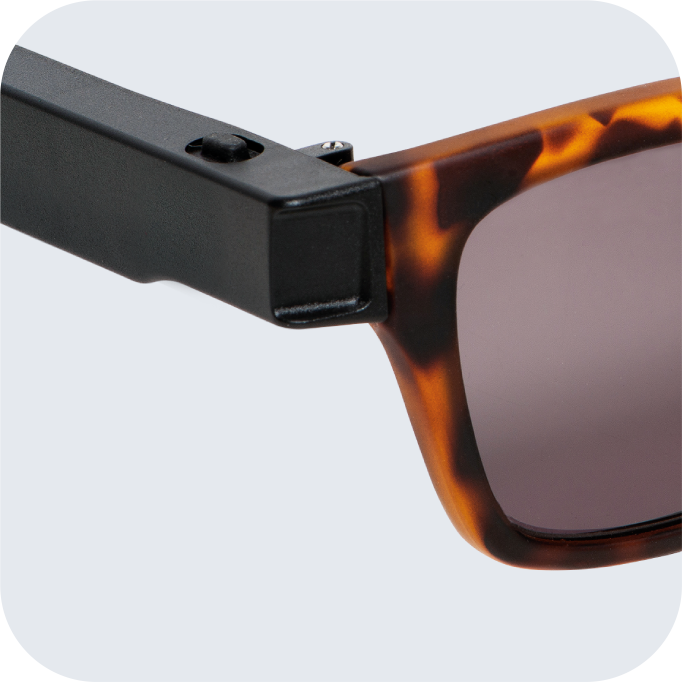
TAMI® assistive mobility eyewear helps protect your upper body from obstacles that a white cane may miss. It uses advanced 60 GHz radar technology to detect objects around you.
The radar sensors are built into the front of each arm of the glasses. They work by sending out electromagnetic signals. When these signals hit an object, some of the energy bounces back to the sensors. By analyzing the returned signal, TAMI® can detect obstacles and estimate their distance.
These sensors work reliably regardless of weather, humidity, temperature, and lighting conditions. They point forward and slightly outward, giving a field of view of about 120 degrees horizontally and 60 degrees vertically.
Feeling obstacles through vibrotactile feedback
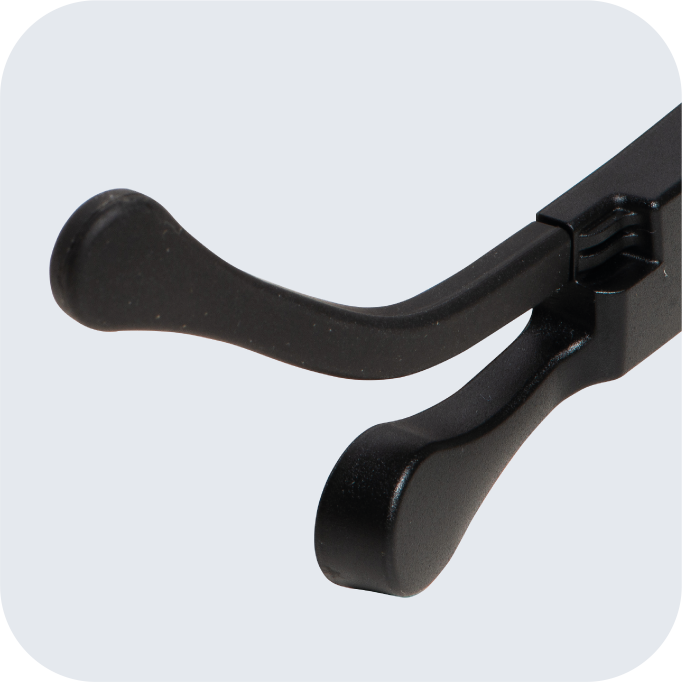
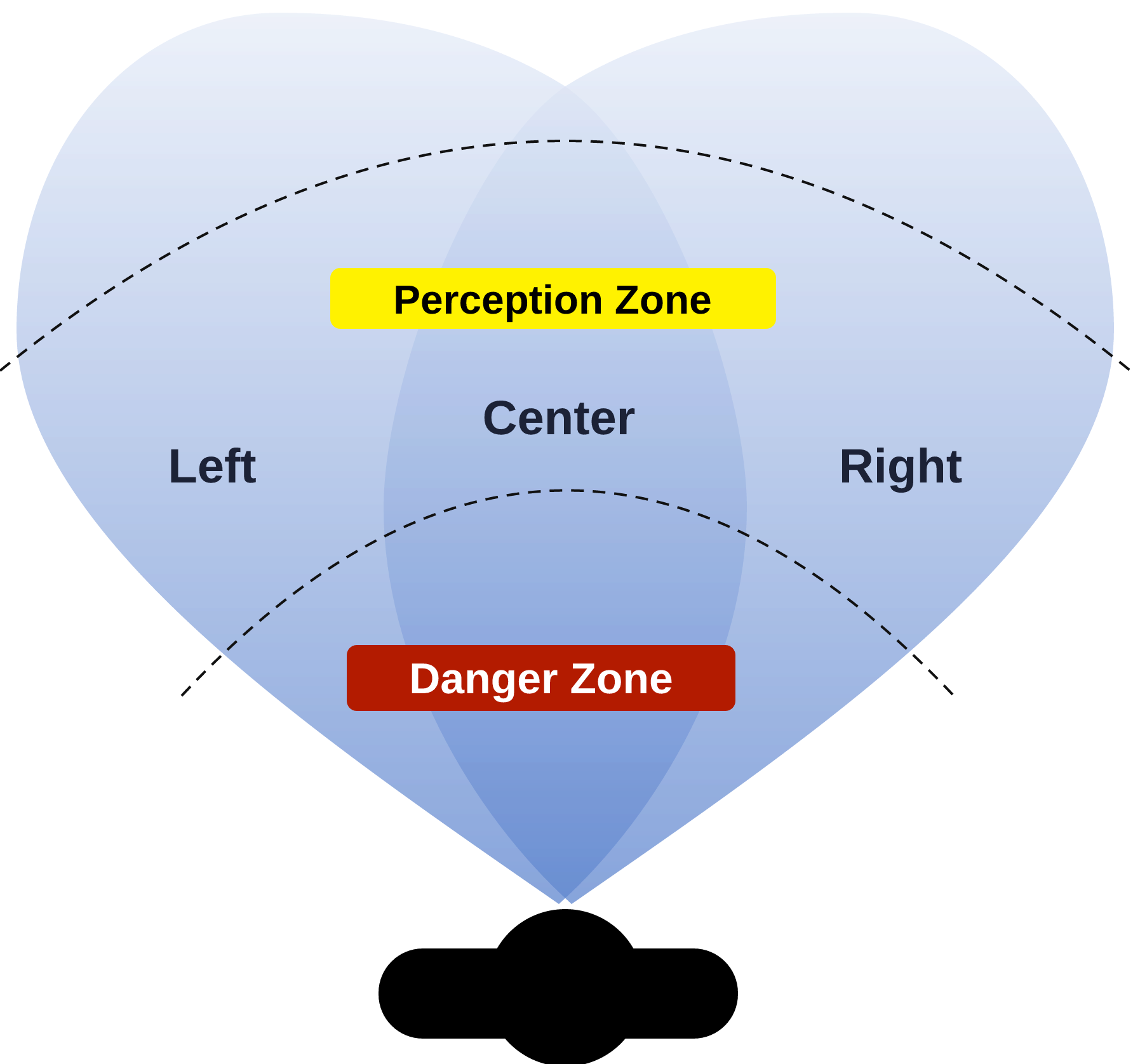
Two vibration motors are housed in the circular elements near the tips of the arms to provide vibrotactile feedback. The vibration motor in each arm tells you when the radar sensors have detected a potential obstacle. In the left zone, only the left arm vibrates; in the center zone, both arms vibrate; in the right zone, only the right arm vibrates. In the perception zone, obstacles make the arms pulse with a gentler vibration. If an obstacle is close to you (danger zone), the arms vibrate with frequent pulses, warning you to stop immediately. The directional vibration (left/center/right) helps you locate the obstacle and get around it safely.
The diagram below shows the sensor coverage area from above, with the perception zone and the danger zone overlaid.
Training to use TAMI® in a simplified environment
Once you have received the device, take as much time as you need to become familiar with TAMI®'s sounds, vibrotactile feedback, and button operation. Below is a series of exercises, best carried out under the supervision of a qualified orientation and mobility specialist. We recommend completing the training phases indoors first, then outdoors. A large, open space such as a gymnasium is ideal for the first indoor exercises; these spaces are free of distractions and hazards such as traffic or urban noise.
The main objectives of indoor training are
- becoming familiar with the sensors' field of view and the short-range and long-range modes (developing distance judgment with the device, and learning to interpret the two pulse frequencies and the sounds associated with the two modes);
- learning to use TAMI® together with the white cane;
- learning to follow a wall or edge without physical contact (trailing);
- learning to avoid pedestrians.
To help you reach these learning objectives indoors or in a simplified environment, we recommend completing the following exercises in the order given:
- 3.1 Locating a large object in short-range mode
- 3.2 Understanding directional feedback
- 3.3 Locating a large object in long-range mode
- 3.4 Locating head-height obstacles that the white cane cannot detect
Note: If you walk with a companion during these exercises, ask them to walk beside you and slightly behind you, so that they are not detected by the radar sensors.
You can do exercises 3.1, 3.2, and 3.3 with or without a white cane and with or without a companion. Exercise 3.4 requires a white cane and a companion.
3.1 Locating a large object in short-range mode
Short-range mode is ideal for feeling the precise location of objects, thanks to subtle changes in the vibrotactile feedback over short distances. For example, it can be used to find the end of a line, locate a doorway, or move around tighter indoor spaces. This first exercise uses short-range mode to help you become familiar with the vibrotactile feedback for the perception zone and the danger zone.
Keep in mind that although the sensors detect objects up to 1.2 m away, the danger zone is only 65 cm!
Use short-range mode when you are moving slowly in a space you know well.
- Turn the glasses on with a long press of the left or right button.
- Press either button once. Each press switches between the modes, and the acoustic signal tells you which one is active. In short-range mode, the two signals are quick and close together; in long-range mode, they are long and further apart. Make sure you can tell the signals of the two modes apart.
- Set the glasses to short-range mode.
- Wearing the glasses, stand about 2 m from a wall or large object, or step back until you no longer feel any vibration on either side.
- Walk forward slowly. Stop when you feel a pulsing vibration. If you are walking straight toward a large obstacle, you will feel vibration on both arms of the glasses: this means there is an object in front of you, at head or upper body height.
- Move forward slowly until the vibration pulses become more frequent. At this point, you should be able to reach out and confirm that the object is there.
- Step back and repeat as needed to become familiar with the meaning of the vibrotactile feedback.
3.2 Understanding directional feedback
The vibration motors, one on each arm of the glasses, let you feel whether an obstacle is in front of you or to your left or right. For this exercise, keep the device in short-range mode.
- Turn the glasses on with a long press of the left or right button. Start by repeating the first steps of the first exercise: move slowly toward a large obstacle, such as a wall or a large pole, until you feel a pulsing vibration on both arms. This means there is an obstacle in front of you, near your head or upper body.
- Turn your head and body to the left until the vibration comes only from the right arm. Vibration on the right side means the obstacle is on your right.
- Now turn to the right until the vibration comes only from the left arm.
- Move forward slowly and notice how the vibration pulses become more frequent as you get closer to the obstacle. When you are very close, you may need to turn further left or right to feel vibration on only one side.
Repeat this exercise until you can clearly tell the difference between vibration on the left, center, and right.
3.3 Locating a large object in long-range mode
Long-range mode is designed for open environments, such as outdoor urban spaces or rural areas. In this mode, the distance thresholds are set farther away (about 2.5 m for the perception zone and 1.2 m for the danger zone), giving you more time and space to react before reaching an obstacle.
Long-range mode works differently from short-range mode: the sensor coverage area is considerably narrower, and there is no side feedback for obstacles directly in front of you, to avoid unnecessary vibrations.
If you use long-range mode in closed or crowded spaces, you may notice more frequent vibrations than in short-range mode. This is because objects within the sensors' field of view are detected at greater distances. As you become more comfortable with TAMI®, you may find it helpful to switch to short-range mode in these situations for better performance.
- Start by standing at least 3 m from a large object that is easy to locate, such as a section of wall, a street pole, or a tree trunk.
- Turn the glasses on with a long press of the left or right button.
- Short press the button to switch from short-range to long-range mode. Confirm the active mode by listening to the acoustic signal.
- Walk at a steady pace toward the large object and notice how the vibration frequency increases as you get closer to the obstacle.
Repeat this exercise until you are familiar with the distance thresholds of long-range mode.
3.4 Locating head-height obstacles that the white cane cannot detect
This advanced exercise helps you detect obstacles at head height, which the white cane often misses. You will need a companion to create these obstacles. Ask your companion to hold an object (such as a book or a padded stick) at arm's length, across your path and at head height.
Safety note: Your companion should always stay close and be ready to stop you, to prevent accidental contact with the obstacle.
- Turn the glasses on and make sure they are set to long-range mode.
- Start walking slowly toward the object. Pay attention to the vibration on the arms of the glasses. When you feel vibrations on both sides, the obstacle is directly in front of you, at head height.
- Stop when you feel quick vibration pulses, which tell you that you have entered the danger zone.
- Turn your head left and right to confirm where the obstacle is.
- You can now try to move forward: use the directional feedback to go around the obstacle, or raise your free arm and use an upper body protective technique to get past it.
Repeat this exercise several times with the obstacle held at different angles, and ask your companion to switch sides; this will help you build confidence in detecting and avoiding head-height obstacles.
Recommendations for outdoor use
After your first steps with TAMI®, the next stage is to gain experience outdoors. The objectives of this training phase include detecting overhanging obstacles and objects along your route, following walls, barriers, fences, or hedges while walking parallel to them, and dealing with pedestrians.
To complete this phase, we recommend walking familiar routes with a companion, such as a friend or an orientation and mobility specialist, who can describe your surroundings and give you useful information.
Start by using TAMI® in long-range mode. Use the device to locate objects along your route. Try switching to short-range mode for more detailed information about the size and distance of objects within arm's reach. TAMI® can help you in familiar places by helping you explore your surroundings more thoroughly and orient yourself. The device can signal objects that are not always in the same place along your route, such as parked vehicles, shop signs, low-hanging branches, and open windows.
Next steps
TAMI® requires you to be attentive to new information arriving through vibrotactile feedback, and interpreting this information takes practice. During your first weeks with TAMI®, take time every day to wear it in different situations.
An app, TAMI Guide, is available for iOS and Android phones. The app lets you customize the distance thresholds of short-range and long-range modes. Before you customize your range mode settings, familiarize yourself with TAMI®'s default settings. If needed, start by customizing short-range mode so that TAMI® works best for the situations you encounter in daily life. For example, if you plan to use TAMI® often at home or in other indoor spaces, you may find it more comfortable to reduce the maximum distance of the perception zone to avoid unnecessary vibration.
Read the TAMI® Guide instructions
Download TAMI Guide
Ready to take your first steps with TAMI®?
Discover the device or re-read the full user manual before you start.